Redesigning Dividends - ZAPIT

Redesigning Dividends - ZAPIT

Domain

Domain

DeFi

DeFi

Year

Year

2022

2022

Role

Role

Lead UI/UX Designer

Lead UI/UX Designer

Zapit is a non-custodial wallet with the aim to be a multi-platform single app solution for universal payments, using the Bitcoin Cash blockchain technology.

Zapit is a non-custodial wallet with the aim to be a multi-platform single app solution for universal payments, using the Bitcoin Cash blockchain technology.

Objective

Objective

To revamp the Dividends functionality within the Zapit Wallet, the goal is not only to create an intuitive user interface that aligns with the newly implemented design system, but also to enhance the user experience by refining the flow for improved usability.

To revamp the Dividends functionality within the Zapit Wallet, the goal is not only to create an intuitive user interface that aligns with the newly implemented design system, but also to enhance the user experience by refining the flow for improved usability.

What are Dividends?

What are Dividends?

The functionality of Dividends is basically the distribution of profits or earnings to holders of a particular token or cryptocurrency.


When you hold certain cryptocurrencies or tokens in your non-custodial wallet and participate in activities like staking, providing liquidity, or engaging in yield farming, you might earn additional tokens as rewards. These rewards are often referred to as dividends, as they represent a share of the profits generated by the underlying blockchain protocols or DeFi platforms.

The functionality of Dividends is basically the distribution of profits or earnings to holders of a particular token or cryptocurrency.


When you hold certain cryptocurrencies or tokens in your non-custodial wallet and participate in activities like staking, providing liquidity, or engaging in yield farming, you might earn additional tokens as rewards. These rewards are often referred to as dividends, as they represent a share of the profits generated by the underlying blockchain protocols or DeFi platforms.

Old Design & User Flow

Old Design & User Flow

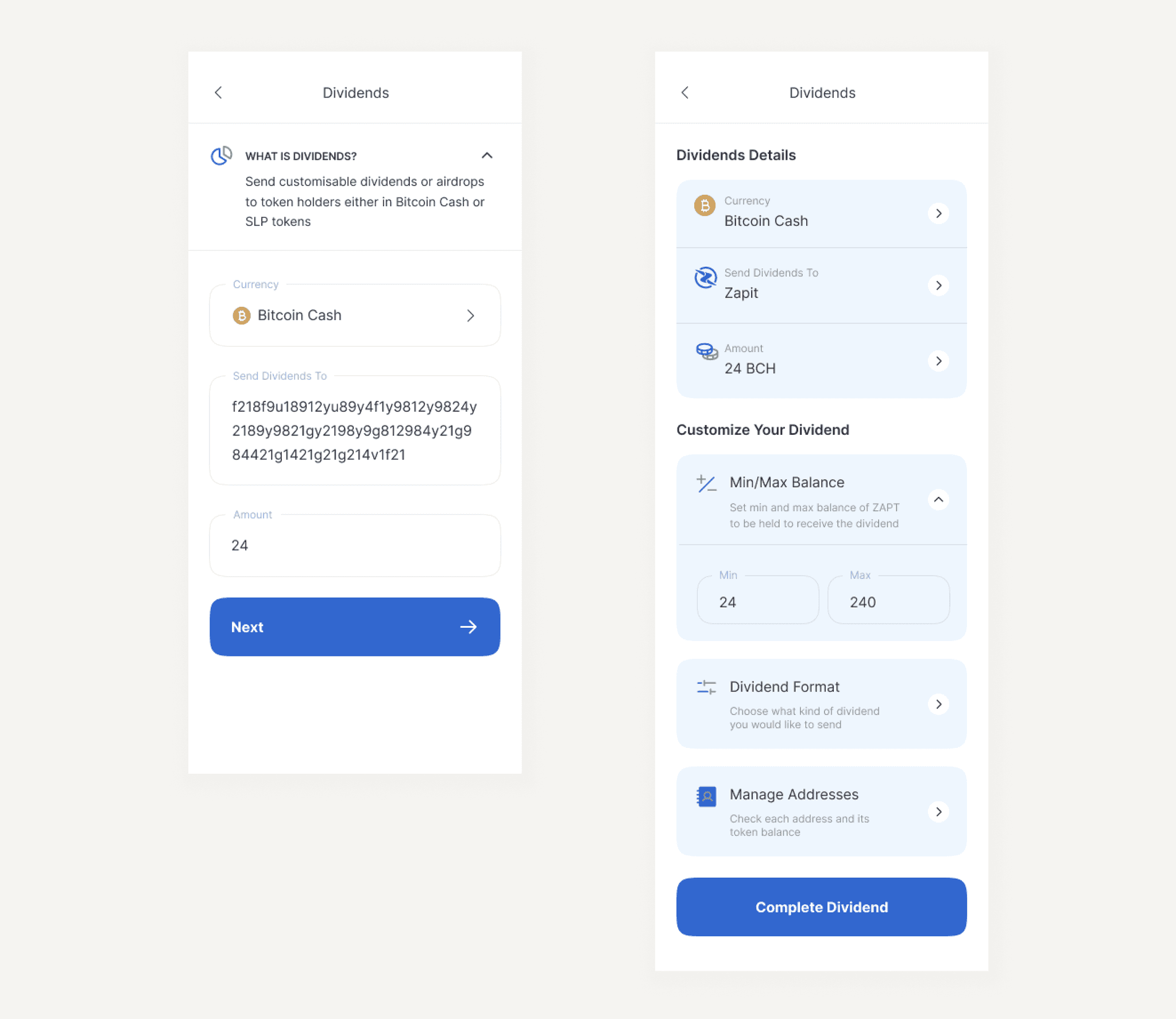
The first screen in the dividends flow contains an information collapsible card, a currency selector, an address and an amount input fields.

After clicking on next, the screen will show us previously selected inputs with additional advanced options to customize our dividends.

Each of these options when clicked on, have their own screens individually.
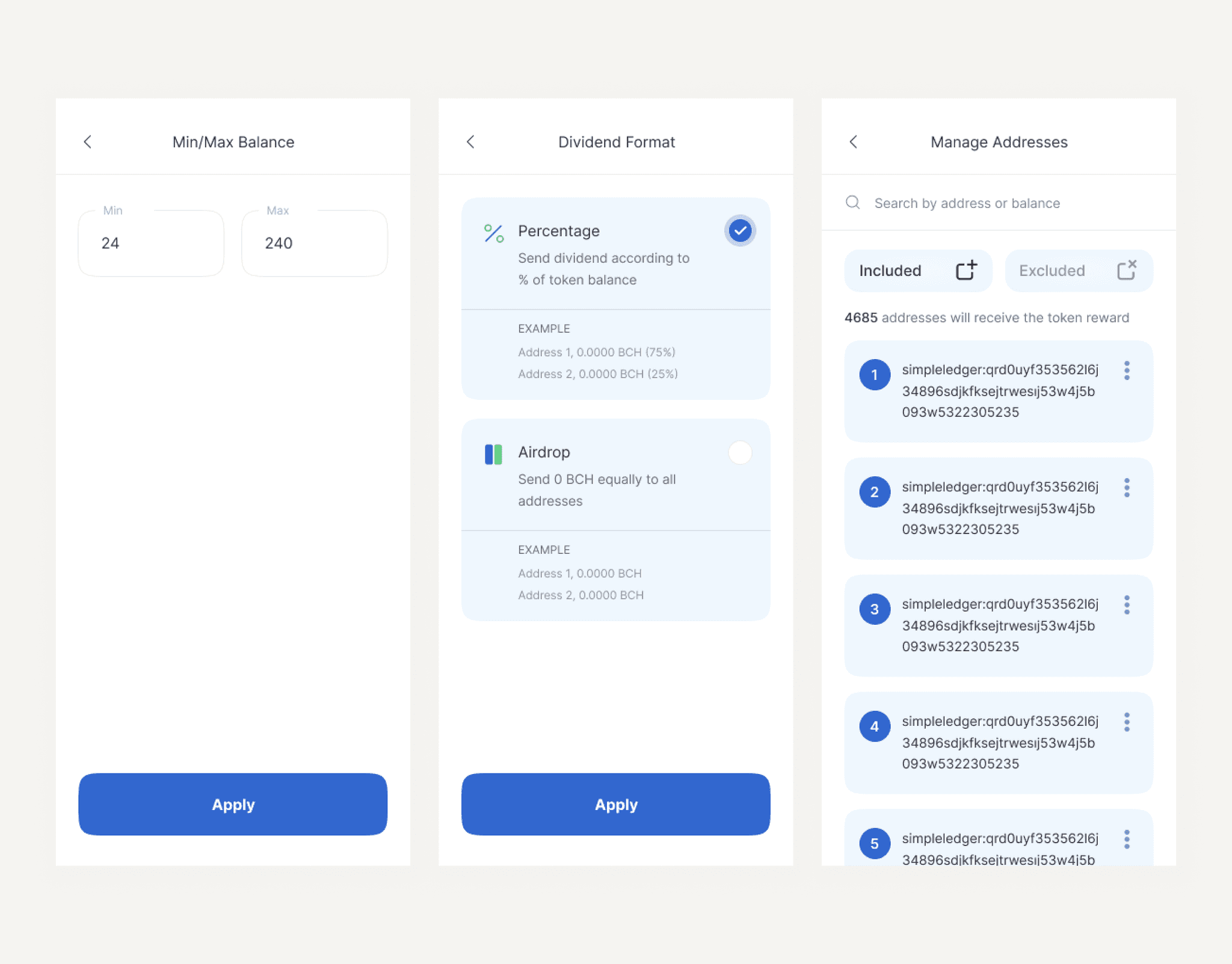
The options we have are -

  1. To set minimum and maximum balance of the token (ZAPT) to be held, to be eligible for receiving the dividend.

  2. Select dividend format as percentage(based on token balance) or airdrop(fixed amount).

  3. To manage addresses, having exceptions for a particular transaction by including or excluding certain addresses.
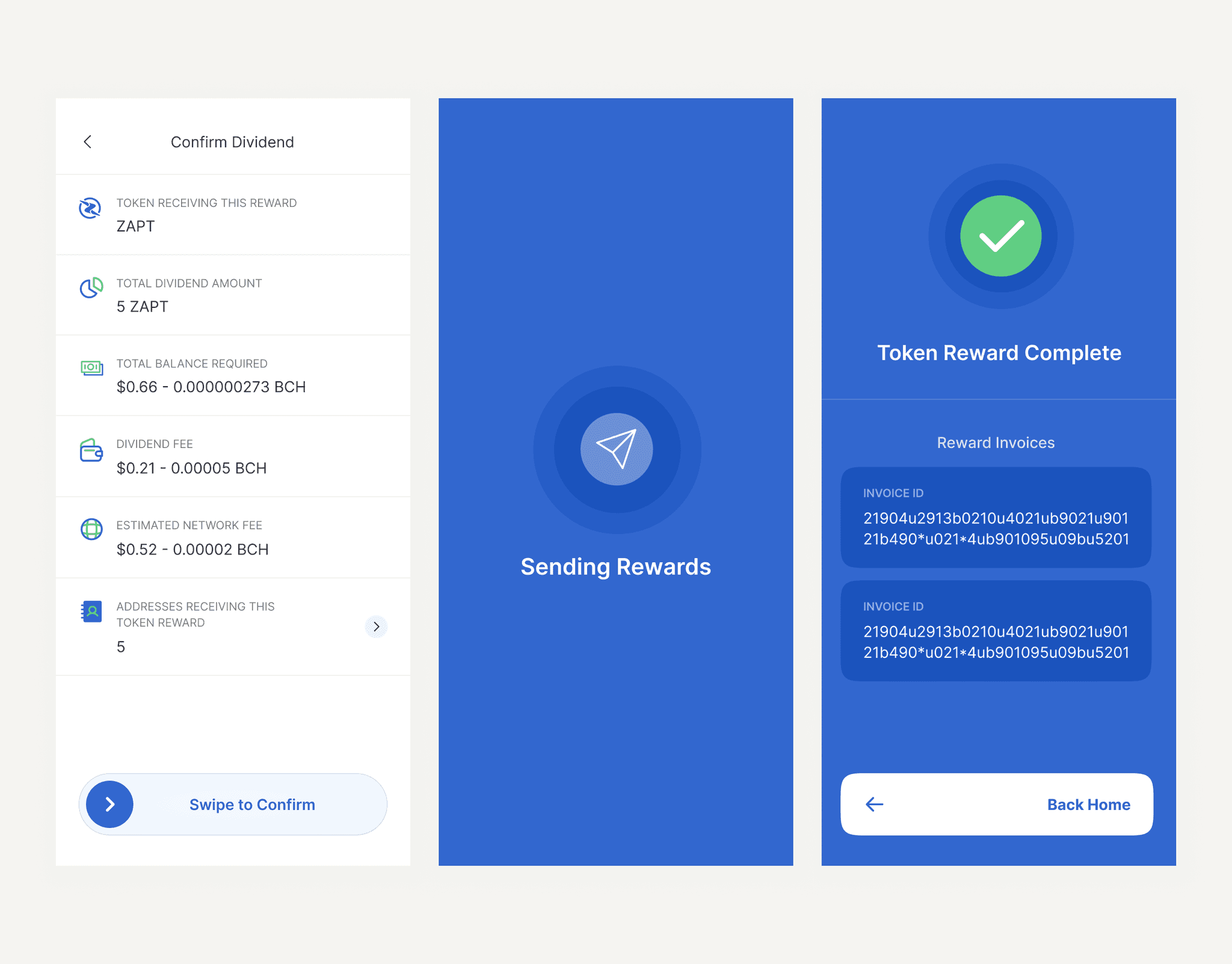
After applying those settings and moving forward, all the confirmation details will be shown and the user has to swipe to confirm to initialize the transaction.

When completed, all the rewards would’ve been sent and their invoices would be shown in the final screen with a back home cta.
Problem Analysis

Problem Analysis

Cognitive Load - Too many screens for users to tap onto, to complete the task.


Users are more likely to take action when the effort is small (Spark Effect). Advanced options should be framed and presented in a way so it’s easier for normal users to opt defaults and the users who do really want to customize the transaction, only they should have it’s full attention.


The interface feels old and can be improved. Not a lot of contrast and hierarchy within segments.

Cognitive Load - Too many screens for users to tap onto, to complete the task.


Users are more likely to take action when the effort is small (Spark Effect). Advanced options should be framed and presented in a way so it’s easier for normal users to opt defaults and the users who do really want to customize the transaction, only they should have it’s full attention.


The interface feels old and can be improved. Not a lot of contrast and hierarchy within segments.

New Design & User Flow

New Design & User Flow

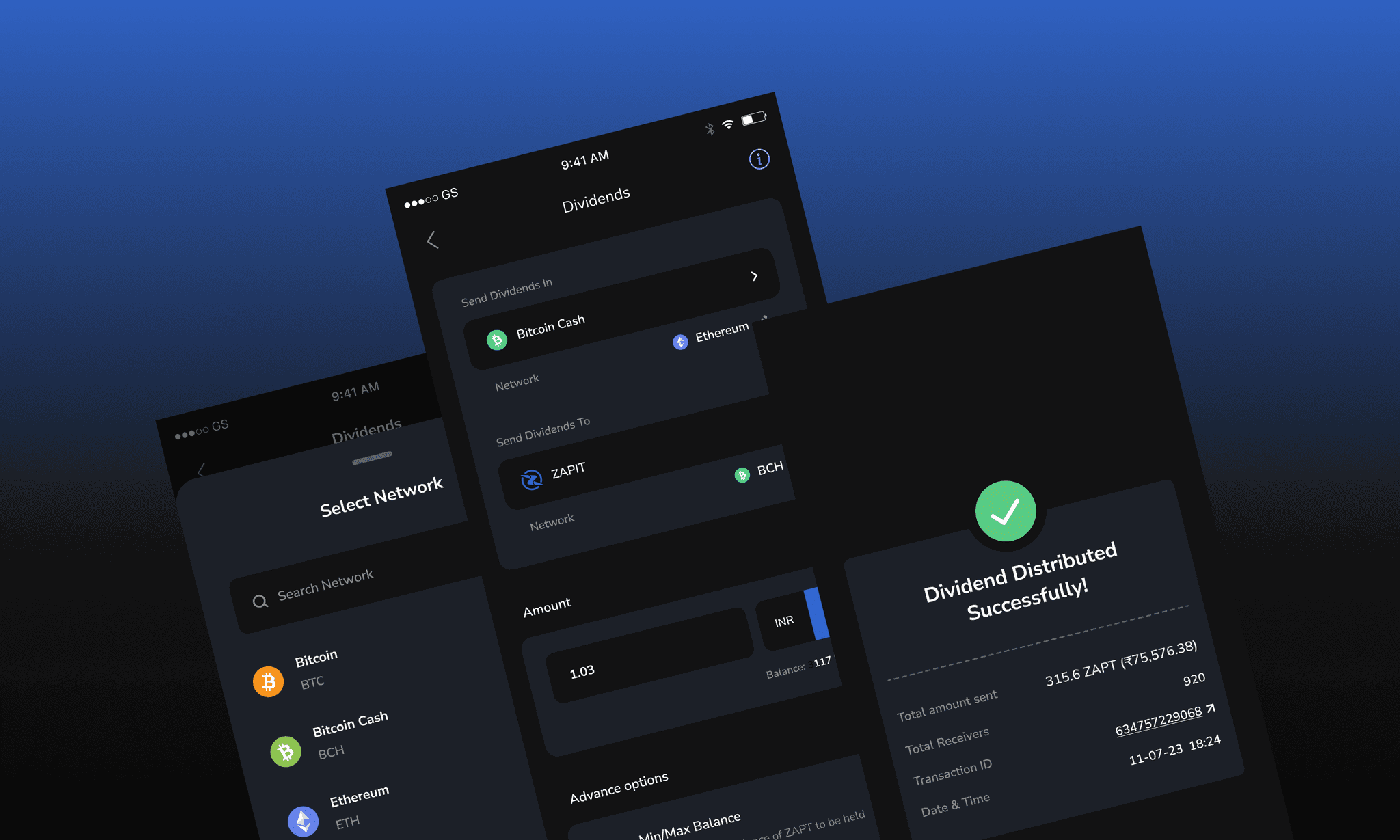
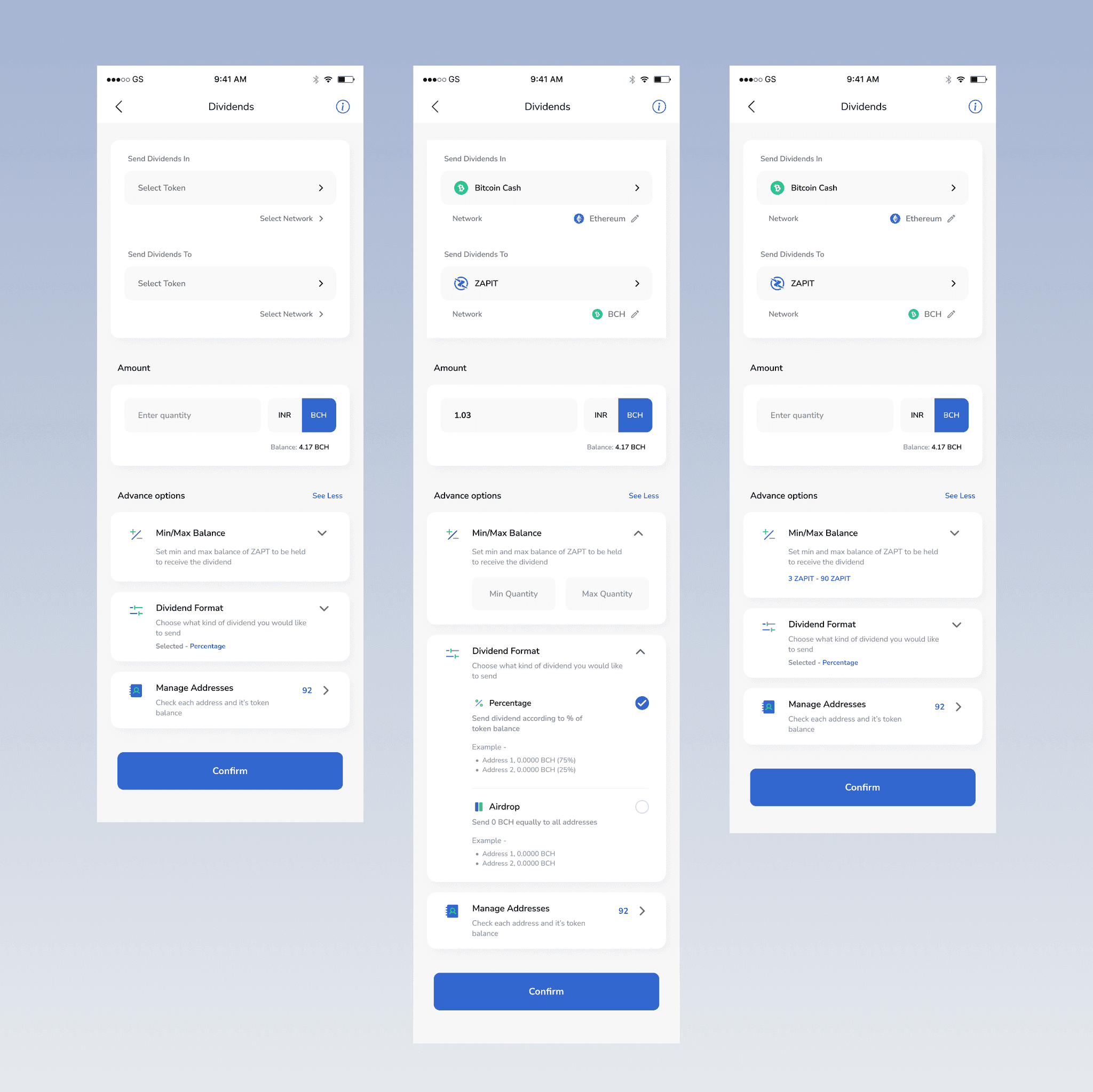
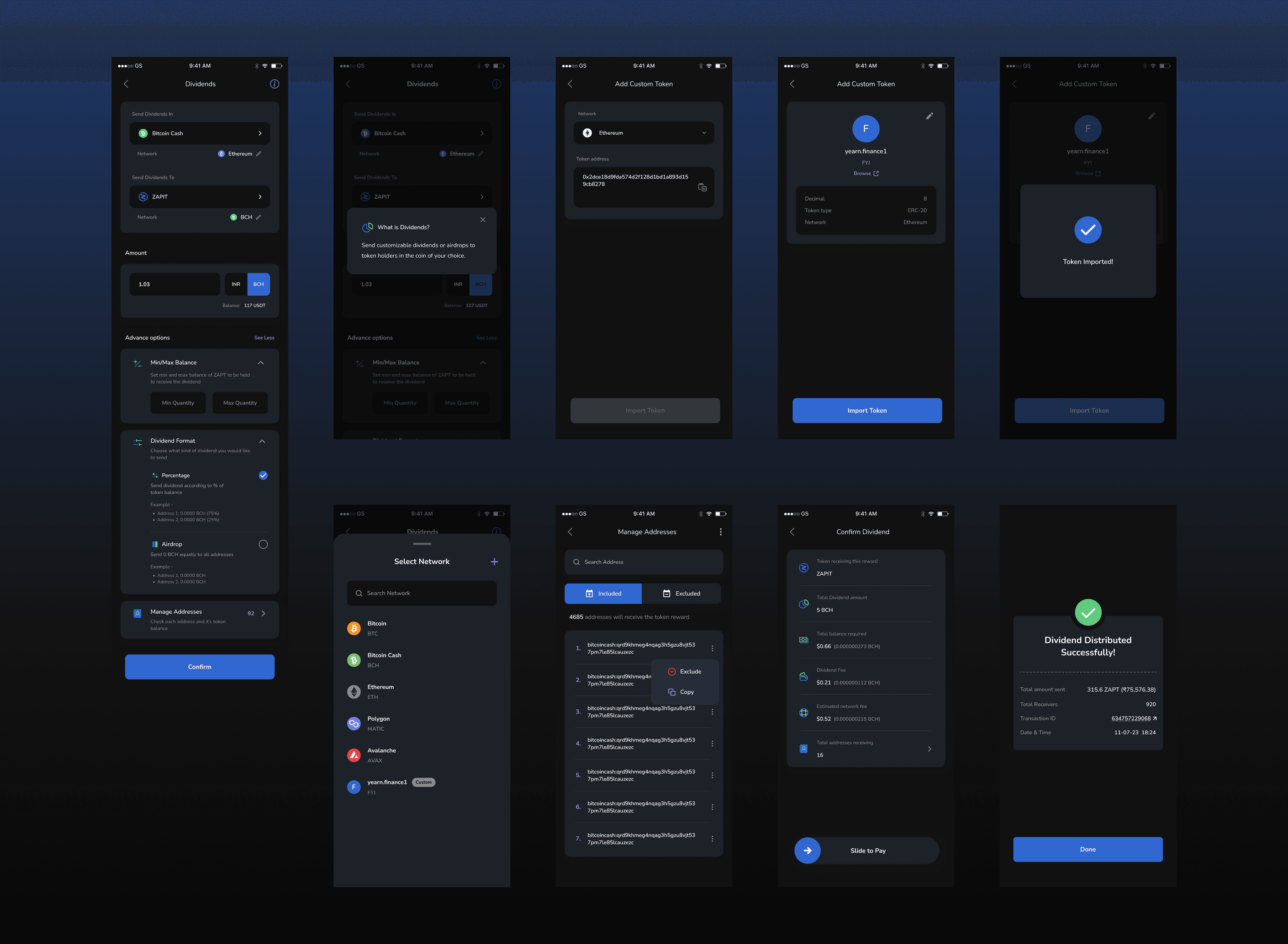
The main dividend screen is divided into 3 segments - selecting tokens, entering amount and choosing advance options.


Earlier each option and field has it’s own screen but now all of them are shown in a single screen as the client wanted, making it easier and faster to complete the task.


Advanced options are in collapsed cards, when expanded the user can customize the transaction and when collapsed the chosen or default values are shown in blue.

The main dividend screen is divided into 3 segments - selecting tokens, entering amount and choosing advance options.


Earlier each option and field has it’s own screen but now all of them are shown in a single screen as the client wanted, making it easier and faster to complete the task.


Advanced options are in collapsed cards, when expanded the user can customize the transaction and when collapsed the chosen or default values are shown in blue.

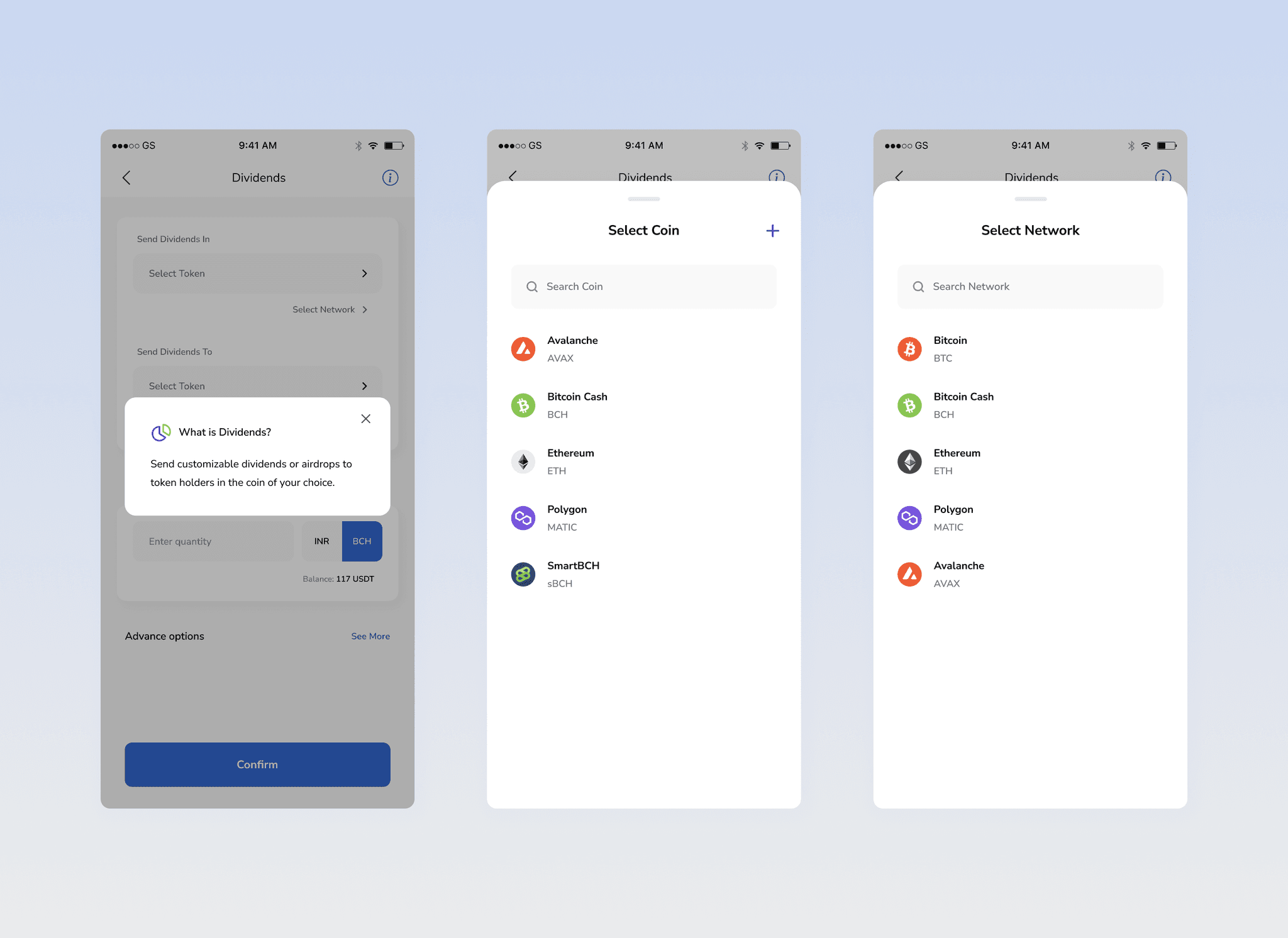
Instead of an Info Card within the frame, I chose to have the info icon as a button in the header. When pressed the info can be shown in pop-up box.

Now when selecting token for either send dividend in or send dividend to, a bottom sheet appears to select the coin/token. After selecting, it automatically opens another bottom sheet to select the network cause some token doesn’t have the need to select different network which can easily be avoided with this flow.
Adding a custom token

Adding a custom token

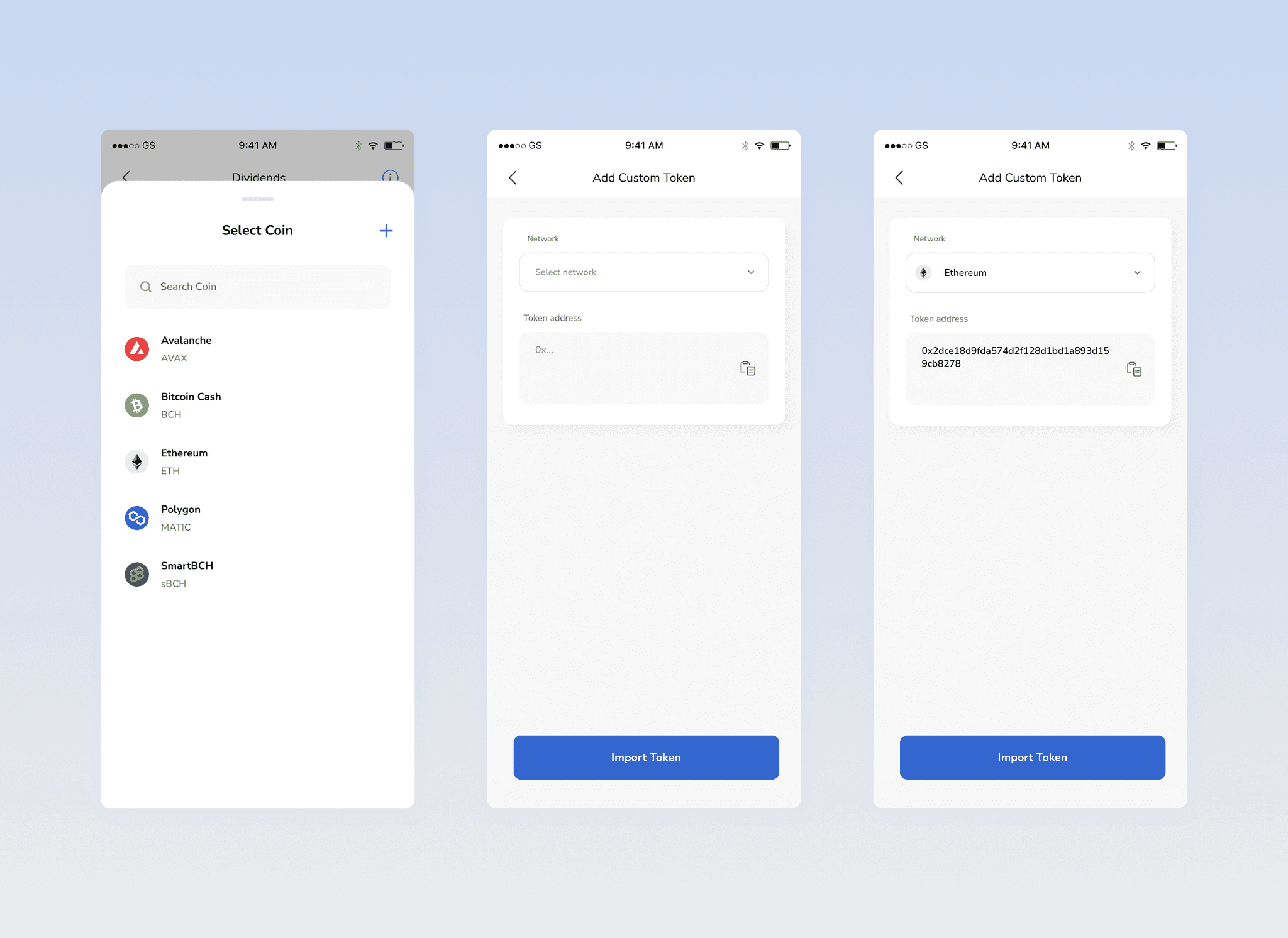
The user can add a custom token by clicking on plus icon in the bottom sheet.

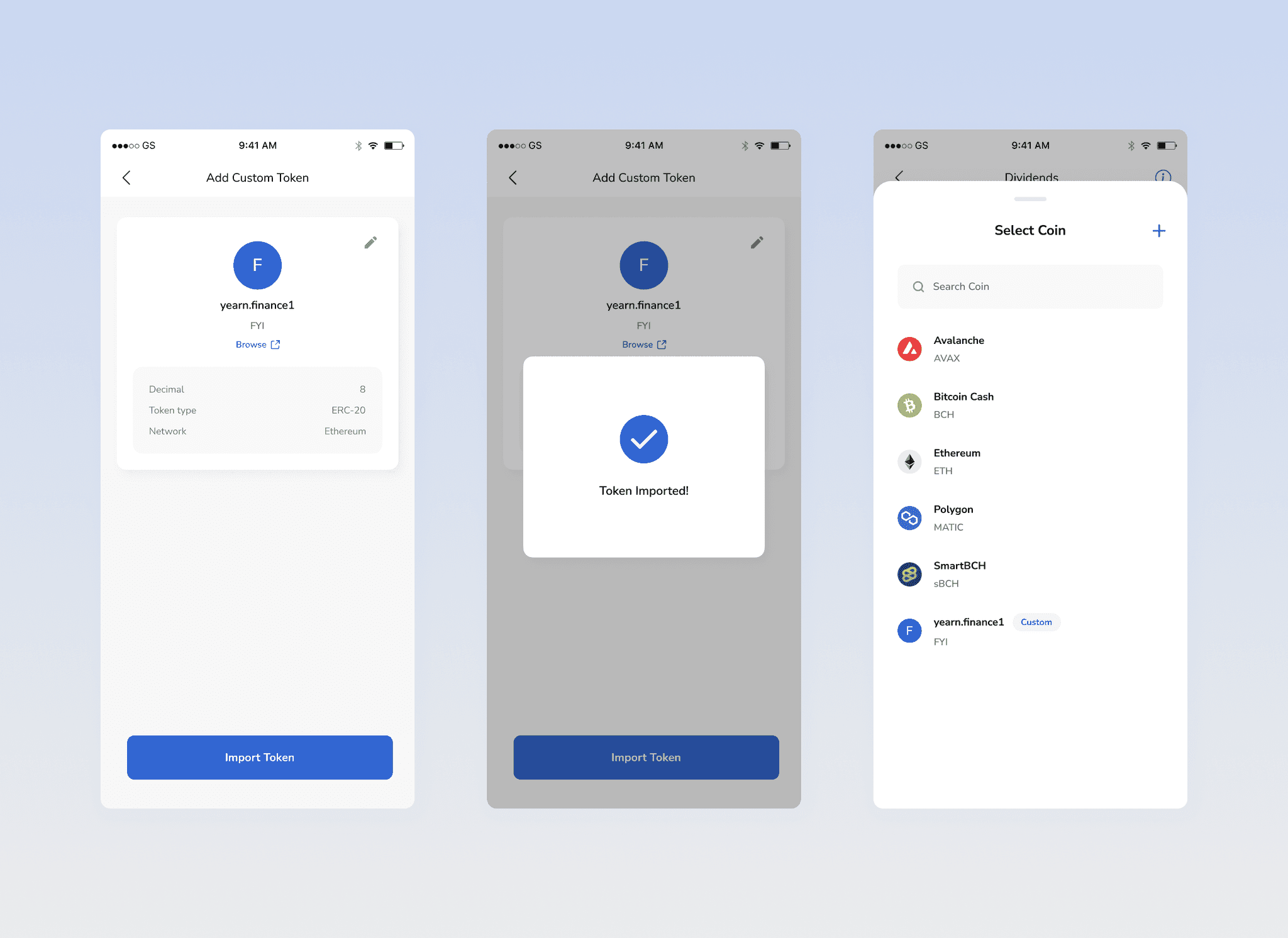
In the first step the user will be asked to select the network and paste the address. The moment the address is pasted, it will automatically fetch the token details from the API and shown in a card with an edit icon. When clicked on edit, it will take the user back.

If the token shown is right, the user will click on import icon. A loading and a success screen will come afterwards. Now the imported token can be seen in the list with a Custom tag.
Managing Addresses

Managing Addresses

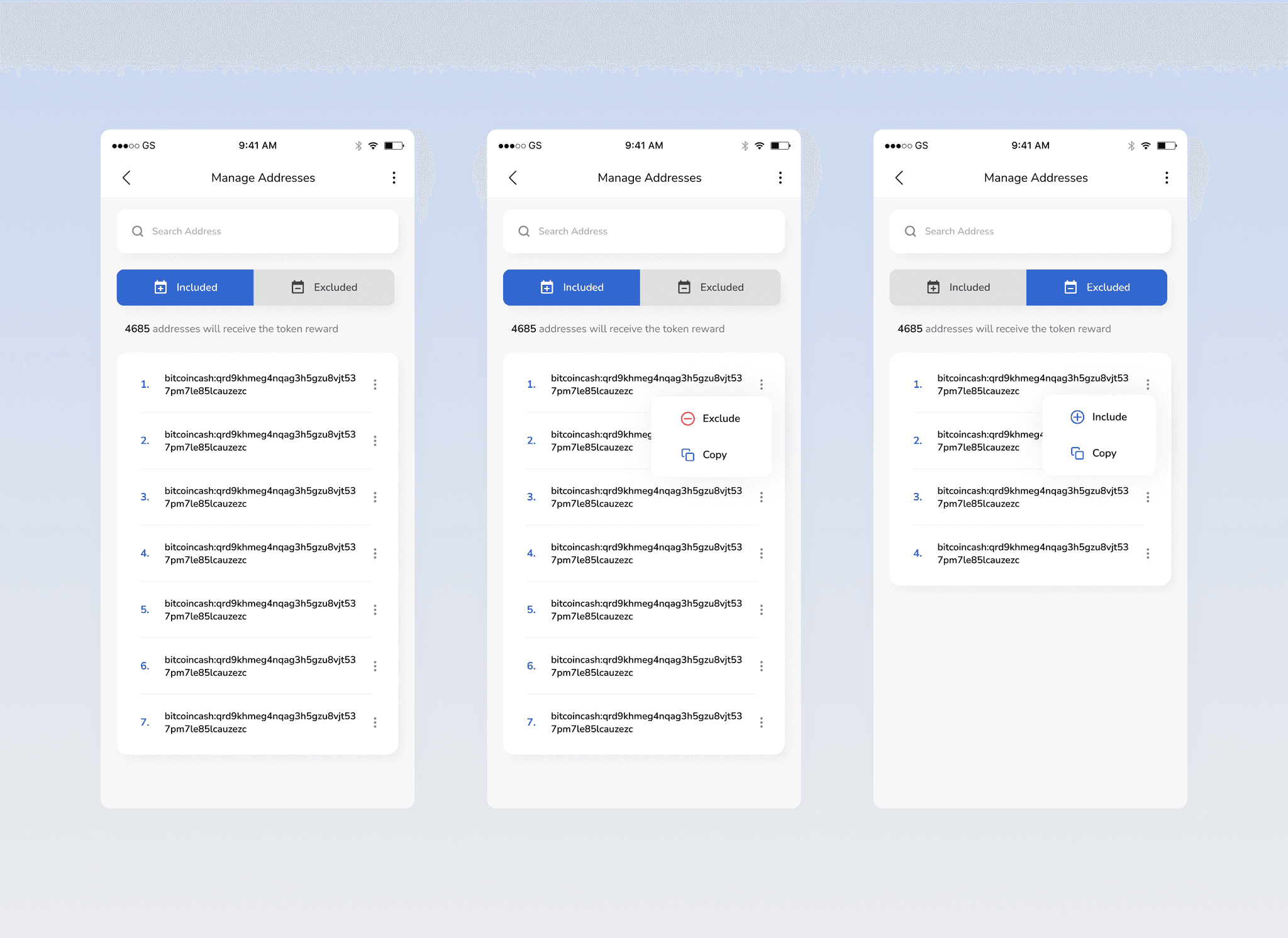
In the advance option there’s an option manage addresses. When tapped will take the user to the list of all the eligible holders of the token (send dividends to).

The user can simply opt out particular addresses by excluding them from receivers for this transaction. They can include them back in.
Confirmation

Confirmation

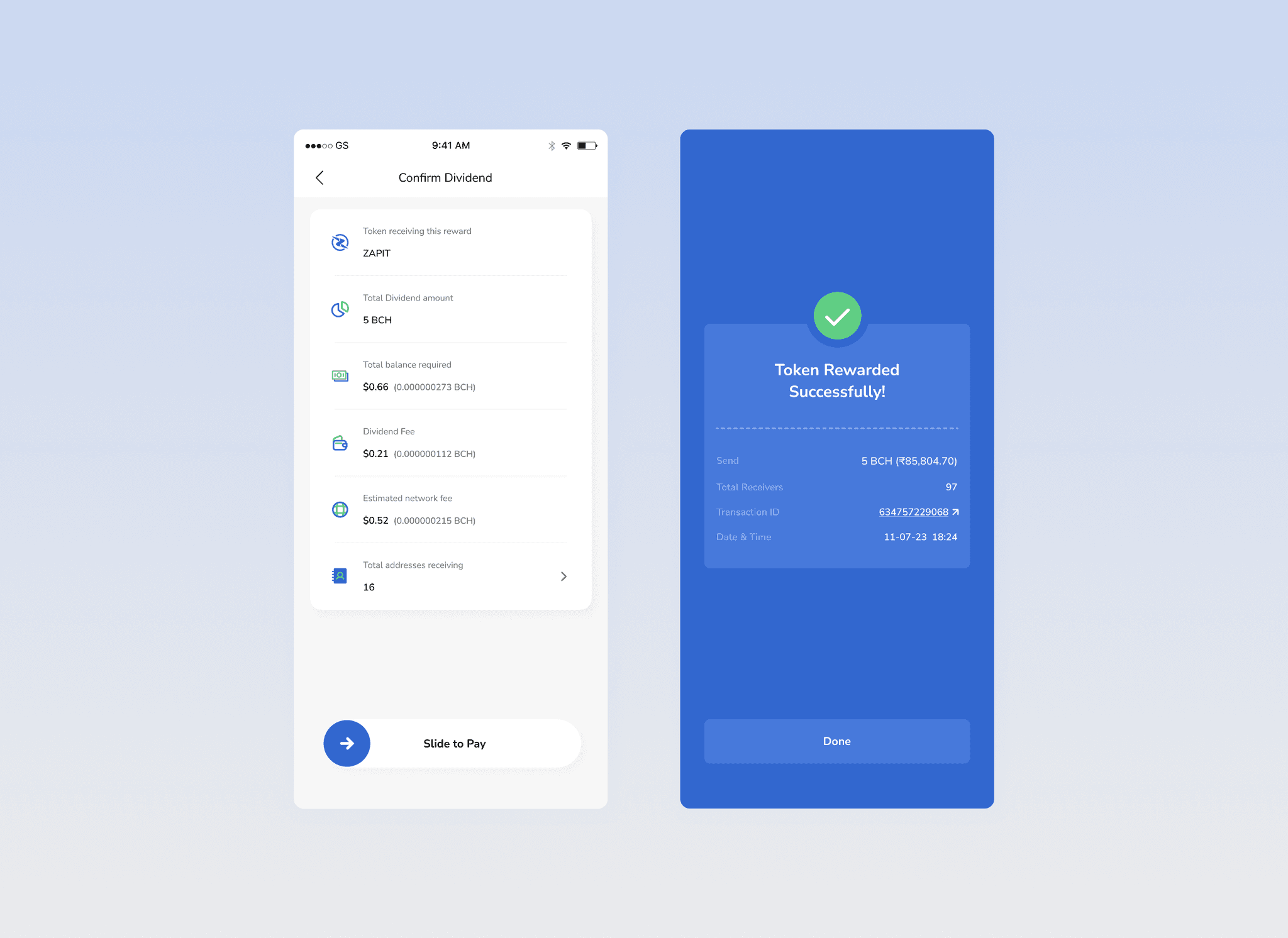
After clicking continue in the dividend screen, a confirmation screen will appear with all the input details and the user can confirm with a slide button.

After transacting, a successful screen will be shown with the transaction details.
Thank you! Every recipient is now rewarded

Thank you! Every recipient is now rewarded

Create a free website with Framer, the website builder loved by startups, designers and agencies.